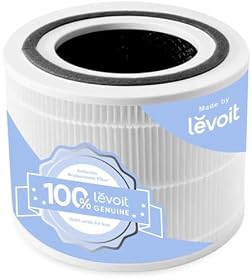
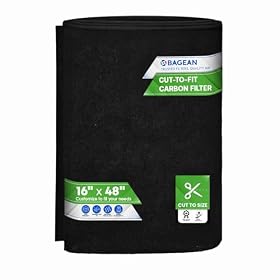
If your air purifier is not reducing dust, the usual causes are a clogged or incorrectly installed filter, weak airflow, poor placement, an undersized unit, or dust entering faster than the purifier can remove it. Follow these checks in order before replacing the machine.
If your air purifier is not reducing dust, check the filter and airflow first. A purifier can only capture airborne particles that pass through it; dust already settled on floors and furniture will not disappear unless it is disturbed and drawn into the intake. A dirty filter, blocked intake, incorrect operating mode, or purifier that is too small for the room can also limit results.
Check the filter first
Turn off and unplug the purifier before inspecting it. Follow the manufacturer’s instructions for opening the filter compartment.
Remove temporary packaging
Replacement filters are sometimes wrapped in plastic for shipping. If that packaging was not removed, the purifier may run but filter very little air. Check that the filter is fully unwrapped and installed in the correct direction.
Inspect the pre-filter
The pre-filter catches larger dust, hair, and lint before they reach the main filter. If it is covered in debris, airflow can drop substantially. Clean it only in the way the manufacturer allows—some pre-filters can be vacuumed or washed, while others should not be exposed to water.
Check the HEPA filter
A visibly gray or heavily loaded HEPA filter may need replacement. Do not wash a HEPA filter unless the instructions specifically say it is washable. A damp or damaged filter can restrict airflow and may not perform as intended.
A filter-change light is useful, but it is not the only indication that a filter needs attention. Heavy dust, smoke, construction debris, pets, or continuous operation can load a filter sooner than the scheduled interval.
Look for blocked airflow or a clogged path
With the purifier running, check whether air is being pulled through the intake and discharged from the outlet. Keep curtains, bedding, furniture, and walls away from the intake and outlet according to the clearance guidance in the manual.
Also check for:
Dust buildup on the intake grille
A blocked outlet
A loose filter cover
Debris inside the filter compartment
A hose, duct, or accessory blocking airflow on models that use one
Do not insert tools or fingers into the fan area. If debris has entered the motor or fan, stop using the unit and follow the manufacturer’s service guidance.
Product prices and availability are accurate as of the date/time indicated and are subject to change. Any price and availability information displayed on Amazon.com at the time of purchase will apply to the purchase of this product.
Confirm the operating mode
Some purifiers reduce fan speed in Auto, Sleep, or Quiet mode. That can be appropriate for nighttime use but may move too little air to reduce dust quickly in a larger or especially dusty room.
For a short period, select a higher manual fan speed and keep doors and windows closed. If dust improves at a higher setting, the purifier may be working normally but not moving enough air on its quieter settings.
If the purifier has a particle sensor, dust buildup on the sensor can cause inaccurate readings or unexpected fan behavior. Clean the sensor only as directed in the manual.
Product prices and availability are accurate as of the date/time indicated and are subject to change. Any price and availability information displayed on Amazon.com at the time of purchase will apply to the purchase of this product.
Reconsider placement
Place the purifier where air can reach the intake freely. Avoid hiding it behind a sofa, under a desk, in a corner, or directly against a wall unless the manufacturer permits that placement.
A central location in the room is often more useful than placing the unit beside a dusty surface. In a bedroom, for example, leave enough space around the intake and outlet for air to circulate. Do not place the unit where it can be knocked over or where water may splash onto it.
A purifier also cannot reliably clean dust from several closed-off rooms at once. If the door is closed, the unit mainly treats the room where it is located.
Product prices and availability are accurate as of the date/time indicated and are subject to change. Any price and availability information displayed on Amazon.com at the time of purchase will apply to the purchase of this product.
Check whether the purifier is large enough
Compare the purifier’s recommended room area or clean air delivery rate with the actual room. Manufacturer room-area claims may be based on different air-change assumptions, so a unit rated for a room’s maximum size may provide slower dust reduction at that limit.
Choose a purifier with enough airflow for the room, especially when ceilings are high, doors are often open, or the space has an ongoing dust source. A small desktop purifier may help near a workstation but will not replace a larger room purifier for a whole living area.
If the room is open-plan, measure the combined space the purifier is expected to serve. One unit may not be sufficient for multiple connected rooms.
Remember what an air purifier can and cannot do
Air purifiers remove airborne dust as air passes through the filter. They do not vacuum dust from carpets, capture every particle immediately, or prevent new dust from entering through open windows, doors, HVAC systems, clothing, pets, or household activity.
For better results:
Vacuum floors and upholstery with suitable filtration.
Damp-dust hard surfaces instead of dry dusting, which can put particles back into the air.
Wash bedding and pet fabrics regularly.
Keep windows closed during periods of outdoor dust or construction.
Check HVAC filters and replace them according to their instructions.
Run the purifier consistently rather than only after dust has settled.
Keep in mind that a visible layer of dust on furniture does not necessarily mean the purifier is failing. Settled dust is outside the purifier’s airflow until it becomes airborne.
Check for unusual sounds or weak performance
If the purifier has clean filters, clear airflow, correct placement, and an appropriate fan setting but still produces very little air, listen for unusual grinding, rattling, or repeated shutoffs. These can indicate a fan, motor, sensor, or control problem.
Unplug the unit and do not bypass safety switches or operate it with damaged wiring, a cracked housing, or a loose power cord. For electrical faults or a burning smell, stop using the purifier and contact the manufacturer or a qualified appliance technician.
When to replace the filter or the purifier
A replacement filter is the reasonable next step when the existing filter is saturated, damaged, missing, or past its usable life. Use the correct replacement specified for the purifier; a filter that fits physically may still have the wrong dimensions, seal, or filtration design.
Consider replacing the purifier when replacement filters are unavailable or disproportionately expensive, the motor repeatedly fails, the housing or power cord is damaged, or the unit cannot produce normal airflow after basic checks. If the purifier is simply undersized, moving to a higher-capacity model may help more than replacing the filter.
Before buying another unit, compare its airflow or room-rating information, filter replacement requirements, intake design, noise at usable fan speeds, and availability of replacement filters. These specifications affect dust reduction more than decorative features or a small air-quality display.
FAQ
Why is my air purifier blowing dust back into the room?
Check that the filter is installed in the correct direction and that the filter cover and seals are closed properly. Also inspect the filter for damage and confirm that dust is not being disturbed near the outlet. Stop using the unit if the housing or filter compartment is cracked.
How long does it take an air purifier to reduce dust?
The time depends on room size, fan speed, filter condition, and how much dust is being generated. A higher fan setting usually moves more air, but an air purifier will not remove dust that has already settled on surfaces without cleaning.
Can a dirty air purifier filter make dust worse?
A clogged filter can restrict airflow and reduce particle removal. If the filter is damaged, incorrectly installed, or the filter compartment is not sealed, performance can be worse. Inspect and replace the filter according to the manufacturer’s instructions.
Will an air purifier remove dust from the whole house?
Usually, one purifier mainly treats the room where it is placed. Closed doors, walls, room size, and limited airflow reduce how much air it can clean elsewhere. Multiple rooms may require separate appropriately sized units.